


VR Mode
Introduction
The VR Mode feature automatically detects VR180/360 stereoscopic video and converts it to a flat 2D output during transcoding. The encoder detects the stereo layout (side-by-side or top-bottom) and projection type (equirectangular or fisheye) of the source, then extracts a front-facing flat perspective.
Using VR Mode feature
VR Mode outputs are created by adding the vr_mode parameter to any transcoding output format. Use the /v1/start_encode2 method to launch a transcoding job with vr_mode set to 1.
Request Example
{
  "query": {
    "encoder_version": 2,
    "source": "VIDEO_URL",
    "format": [
      {
        "output": "mp4",
        "vr_mode": 1,
        "destination": [
          {
            "url": "URL",
            "key": "KEY",
            "secret": "SECRET"
          }
        ]
      }
    ]
  }
}
vr_mode — controls whether VR detection and flattening is applied to this output.
If VR content is detected, the output resolution is automatically adjusted based on the extracted field of view — you don't need to precalculate it yourself.
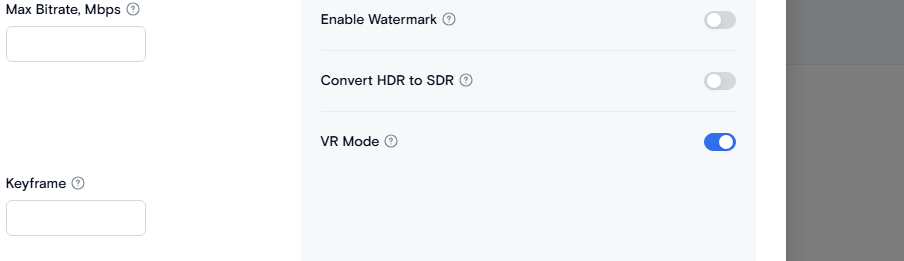
- On the Transcode Media page choose an output format.
- Open the Resolution Settings by clicking the Advanced Settings
- Turn on the VR Mode toggle.
Available Modes
| Mode | Value | Description |
|---|---|---|
| Disabled | 0 | Default. No VR detection, video transcoded normally. |
| Auto-detect | 1 | Detects VR180/360 content and converts it to flat 2D if confirmed. |
Requirements for Video Upload
- Source layout: Side-by-side or top-bottom stereoscopic frame, aspect ratio (or inverted aspect ratio) between 1.8 and 2.2.
- Projection: Equirectangular or fisheye.
- Encoder version: VR Mode requires Encoder Version 2.

Applying VR Mode Across Output Types
VR Mode isn't limited to standard video output — the same vr_mode parameter is supported across multiple output types:
| Output Type | Behavior |
|---|---|
| Video (mp4, etc.) | Applies the v360 filter to the full video stream |
| HLS / DASH | Applies per stream; specify vr_mode on the stream object |
| Thumbnail | Extracts a flattened frame instead of a raw VR frame |
| Image | Extracted image is de-projected using the same VR aspect logic |
| AI Detection | Frames passed to AI detection are flattened first |
Need More Help?
For additional information, tutorials, or support, visit the Qencode Documentation page or contact Qencode Support at support@qencode.com.